Panda Lux LED lighting upgrade kit for Bambu Labs P1 / X1 printers

Panda Lux LED lighting upgrade kit for Bambu Labs P1 / X1 printers

$9.99
Sale price  $9.99 Regular price 
Skip to product information
Panda Lux LED lighting upgrade kit for Bambu Labs P1 / X1 printers

Panda Lux LED lighting upgrade kit for Bambu Labs P1 / X1 printers

$9.99
Sale price  $9.99 Regular price 

BIQU Panda Lux LED Upgrade Kit for Bambu Lab P1P, P1S, X1C — 31-LED 6000K Light Bar, Magnetic Mount, Screen-Controlled

The stock light bar on your Bambu Lab P1 or X1 is functional, but barely enough for monitoring first layers or catching failures through the camera. The BIQU Panda Lux replaces it with a purpose-built 31-LED, 6000K aluminum light bar that mounts magnetically to the front door frame, plugs directly into your printer's original light-bar connector, and is controlled from your printer's existing screen — no new apps, no separate switches, no wiring modifications.

Compatible with: Bambu Lab P1P, P1S, X1C.

⚠️ This version is for P1 and X1 series printers only. The A1 and A1 Mini use a different Panda Lux variant with adhesive backing — verify your printer model before ordering.
⚠️ Does not impair the LiDAR sensor. The front-facing beam angle is designed specifically to avoid interfering with the X1C's LiDAR first-layer scanning.

BIQU Panda Lux LED light bar for Bambu Lab P1P P1S X1C — 31 LEDs 6000K mounted on front door frame

31 LEDs at 6000K — Daylight-Accurate Illumination for the Print Area

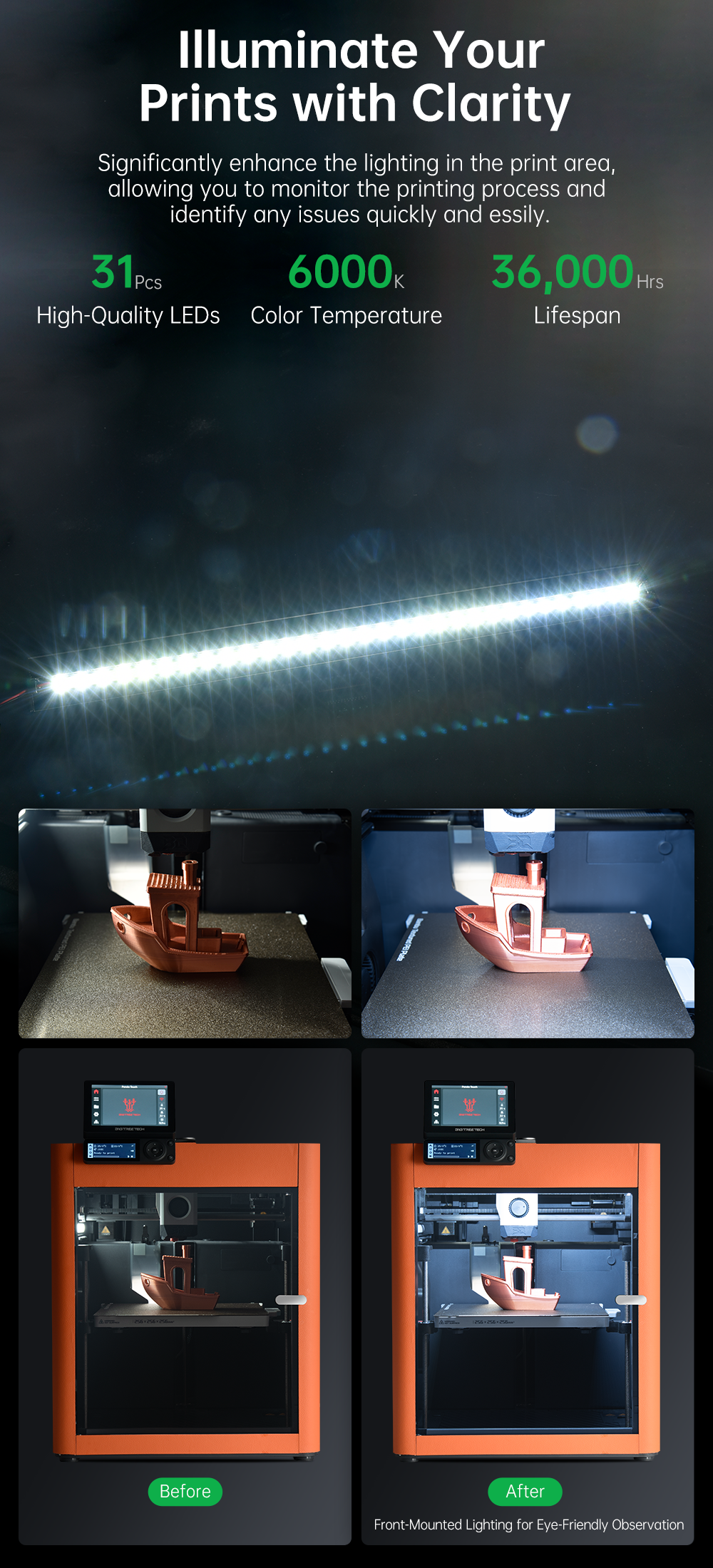
Color temperature determines how accurately you see what's happening on your build plate. The Bambu stock light bar runs warm and dim — prints look fine until you're trying to spot a delamination, a lifted corner, or a stringing issue developing in real time. At 6000K (daylight white), the Panda Lux renders your print and bed surface with accurate color and contrast, making it immediately obvious when something is going wrong. Across 31 individual LEDs distributed along the full width of the door frame, illumination covers the entire build area evenly with no hot spots or dark corners. The light also dramatically improves time-lapse quality — your camera is working with consistent, neutral light instead of fighting against warm ambient glow.

BIQU Panda Lux 6000K daylight LED illumination comparison — before and after on Bambu Lab P1P build plate

Front-Facing Design — Bright Print, No Glare in Your Eyes

Most aftermarket LED upgrades for 3D printers bounce light off walls or flood the room. The Panda Lux uses a front-facing beam geometry aimed directly at the build plate, not at the user. You get maximum illumination on the print area and minimal glare when you're standing in front of the machine checking a first layer or swapping filament. It's a small design detail that matters significantly if your printer lives on a desk or workbench at eye level.

BIQU Panda Lux front-facing LED angle — directed at print bed to minimize glare on Bambu Lab P1S

Magnetic Mounting — Tool-Free, Repositionable, Secure

The Panda Lux attaches to the underside of the P1/X1 front door frame via integrated magnets. Align it centered on the frame, let the magnets engage, and it's done. No screws, no drilling, no brackets to print. Double-sided adhesive tape and electrical tape for cable routing are included for additional reinforcement if needed, but the magnetic hold is sufficient for normal operation. If you ever need to remove the door or service the front panel, the Panda Lux detaches in seconds and remounts just as fast.

BIQU Panda Lux magnetic mounting system — attaches to Bambu Lab P1P X1C front door frame with no tools

Original Connector Integration — Controlled From Your Printer Screen

The Panda Lux plugs directly into your printer's existing light-bar connector on the AP board (P1 series) or the right-side frame panel (X1 series). This means the Panda Lux is recognized by Bambu firmware as the native light bar — it turns on and off through your printer's touchscreen exactly like the stock bar did, with no additional hardware, no firmware modification, and no external controller to manage. The cable routes along the door frame edge seam and is included in the kit with enough length for clean routing on both P1 and X1 variants.

BIQU Panda Lux wiring — connects to original Bambu Lab light bar connector on AP board P1P P1S X1C

Aluminum Alloy Housing — Built for the Heat of a 3D Printing Environment

LEDs generate heat, and heat is the primary cause of LED degradation over time. The Panda Lux uses an aluminum alloy housing that functions as a passive heatsink, dissipating thermal load across the bar's body rather than concentrating it at individual LED junctions. This extends LED lifespan significantly compared to plastic-housed alternatives and keeps output consistent through long print sessions. The aluminum construction also gives the bar rigidity and a fit that matches the aesthetic of Bambu Lab's own hardware.

BIQU Panda Lux aluminum alloy housing — passive heat dissipation for long LED lifespan on Bambu Lab printers

Specifications

Brand BIQU
Model Panda Lux (P1/X1 version)
Compatible printers Bambu Lab P1P, P1S, X1C
NOT compatible with Bambu Lab A1, A1 Mini (different variant required)
LED count 31 LEDs
Color temperature 6000K (daylight white)
Housing material Aluminum alloy
Mounting method Magnetic (tool-free)
Power source Printer's original light-bar connector — no external power required
Control Printer's native touchscreen (P1/X1 stock interface)
LiDAR compatibility Yes — beam angle does not interfere with X1C LiDAR
Beam direction Front-facing — aimed at build plate, minimizes user glare
Firmware modification required No
Installation Magnetic attachment to front door frame underside

What's Included

1× Panda Lux LED bar (aluminum alloy, 31 LEDs)
1× Connector cable (pre-wired for P1/X1 light-bar port)
Double-sided adhesive tape (optional reinforcement)
Electrical tape for cable routing

Installation Overview — P1 and X1 Series

Step 1: Attach the Panda Lux to the underside of the front door frame, centered — magnets engage automatically.
Step 2 (P1): Remove the protective cover from the AP board (USB port PCB). Step 2 (X1): Open the plastic cover on the right side of the frame.
Step 3: Route the cable along the door frame edge seam toward the top. Secure with electrical tape if needed.
Step 4: Disconnect the stock light bar connector and connect the Panda Lux cable in its place.
Step 5: Power on your printer and control the Panda Lux from the touchscreen — same as the original light bar.

BIQU Panda Lux installation steps for Bambu Lab P1P and X1C — cable routing and connector swap guide

When Do You Need This?

If you rely on your Bambu Lab's camera for remote monitoring, time-lapses, or first-layer inspection and the stock lighting is making it difficult to see clearly — this is the direct fix. It's also the right upgrade if you print frequently at night or in a dimly lit space and want consistent visibility without relying on room lighting. The magnetic mount and native screen control make it the cleanest LED upgrade available for the P1 and X1 series without touching firmware or adding any external hardware.

Browse our full Bambu Lab upgrade selection at 3D Printer Electronics, or explore all compatible upgrades at 3D Printer Upgrades.

Related products